Ahead of the Wave
Business phones that are ready to ring the day they arrive.
We build your phone system on WaveCore PBX, set up every phone before it ships, and move your existing numbers over. Your team plugs in and starts taking calls.
- Keep your existing numbers
- No on-site install
- Phones work from home or any location
- Support from the people who run the system
Three steps, and we do most of them.
No technician visit and no server in your closet. The system runs on our side; the phones just need a network jack, or your Wi-Fi.
- 01
Tell us about your office
How many people, which numbers, and how calls should flow. We map out the greeting, ring order and after-hours rules with you.
- 02
We build it and ship the phones
Your system is built on WaveCore PBX, and each GRP2613W is set up with its extension before it leaves us.
- 03
Plug in and go
Connect each phone to a network jack; a PoE switch powers it over the cable, or use the adapter in the box. A cable gives the clearest calls, but no jack nearby? It can join your Wi-Fi. We schedule your number transfer with you.
Your office is wherever there's internet.
WaveCore PBX runs in our data center, not in a box in your closet, so a phone doesn't have to be in the office to be part of it. Plug it in anywhere with internet and it rings just like it does at the desk.
Work from home
Take your desk phone home and plug it into your home internet. Same extension, same number, and coworkers transfer calls to you as if you were down the hall.
Every location, one system
A second office, a warehouse or a shop across town all share one phone system: one directory, one auto attendant, and everyone dials each other by extension.
On the road
The mobile app puts your work extension on your mobile phone, so calls reach you even when you're nowhere near a desk.
Moving a phone to a new address, like someone's home? Tell us first, so 911 has the right location for it.
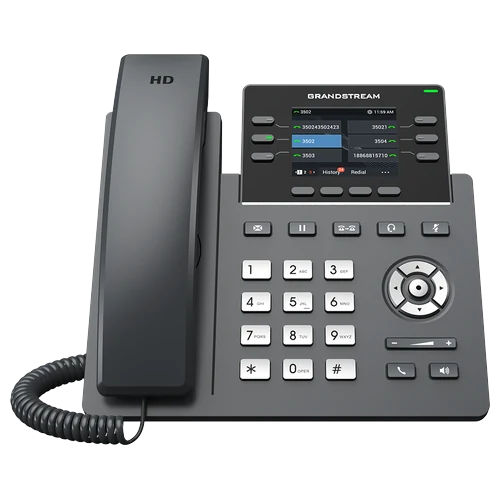
Grandstream GRP2613W
Our standard desk phone: a color screen, 6 line keys and HD audio, with Wi-Fi built in. Need more keys? See all our phones.
HD audio, on the handset and the speaker
Wideband HD audio on the handset and the speakerphone, with Noise Shield to keep the office noise out of your calls.
A 2.8-inch color screen
320 × 240 and easy to read at a glance: who is calling, which line they called, and what each key does.
6 BLF keys, each with its own light
Set up with Park 1–3, Page All, Intercom and Page, so a parked call or a page is one press away. The screen pages through up to 24 keys for coworkers, parked calls and speed dials.
Wi-Fi built in
Dual-band Wi-Fi 6, so a desk without a network jack still gets a phone: plug it into the wall for power and it joins your Wi-Fi. Calls are clearest on a network cable, so we recommend wiring in wherever you can.
Set up before it ships
Your extension and settings are loaded before it leaves us. Plug it in and it rings.
- 2.8" color320 × 240 screen
- 6 line keysup to 6 SIP accounts
- Wi-Fi 6and Bluetooth built in
- Gigabit + PoEor the 5V adapter in the box
Need more keys? The GRP2624 has 8, and the GRP2670 has 12 on a 7-inch touch screen, both with Wi-Fi and Bluetooth built in too. Staff away from a desk? The WP826 and rugged WP836 are cordless Wi-Fi handsets. Compare phones
Your number comes with you.
We move your existing numbers over from your current provider and schedule the switch with you, so customers keep calling the number they already know. Need new ones? We set you up with local numbers.
Everything a business phone system should do.
Included with the service, configured for you, and changed for you when your office changes.
Auto attendant
"Press 1 for sales" menus that send every caller to the right person or team.
Ring groups & queues
Ring several phones at once or in order, or hold callers in a queue with music until someone is free.
Business-hours routing
Open hours, after hours and holidays each send calls exactly where you choose.
Voicemail to email
New messages land in your inbox as audio with a written transcript.
Mobile app
Make and answer calls on your work extension from your mobile phone.
Call recording
Record calls for training, quality checks or your records.
Park, paging & intercom
Park a call and pick it up anywhere, page the office, or buzz a coworker directly.
Conference bridges
Your own dial-in conference rooms for team meetings and client calls.
Fax to email
Incoming faxes arrive in your inbox as PDFs. No fax machine to maintain.
Emergency 911
911 always gets through, with your service address registered for emergency responders.
Call blocking
Block unwanted numbers and nuisance callers for the whole office.
Keep your number
We move your existing numbers over from your current provider, or set you up with new local ones.
One company for the phones, the system and the support.
We build it and run it
WaveCore PBX is our own platform. When you need help, you reach the people who built it, not a reseller's ticket queue.
Redundant by design
Calls are handled by a cluster of servers, so one server going down doesn't take your phones with it.
Set up for you
We configure the system and the phones, move your numbers, and walk your team through it.
Ready to switch your phones?
Tell us how many people and numbers you have, and we'll put together a quote for the phones and the service.